Reading the layouts
Each template below is a Python function in components/layouts.py that assembles a full HTML page from fragments (headers, sidebars, body_html, etc.). Names like showcase_page map to those functions.
Canonical doc shell
showcase_page is the canonical layout for generated static documentation in sibling projects. Use generator/build-showcase.py as the reference for how to call it. The other layouts below are legacy or specialized (landing/hero, gallery grids, split panels, blueprint handbook/chapter/product shells)—use them only when you have a specific need.
What the schematic shows
- Wireframe diagrams (below each section) are static SVGs — they only illustrate region names.
- Open live preview loads a real built page inside an iframe in the modal, with a short region legend on the right.
- Showcase, landing, and gallery reuse existing pages (
tokens.html,index.html,diagrams.html). Split has a first-class pagesplit-layout.htmlpluspreview-split.html; listing usesenterprise-marketing.htmlandpreview-listing.html. Handbook, chapter, and product use generatedpreview-handbook.html/preview-chapter.html/preview-product.html.
showcase_page
Documentation reference layout: unified sticky header + sidebar + content + optional right-rail ToC. This is the primary layout for component documentation sites.
How the regions connect
- Top: sticky site header (brand + breadcrumb + page title).
- Left: scrollable sidebar below the header.
- Center: main article column (body_html).
- Right: optional ToC (toc_html); omit for two-column layouts like gallery.
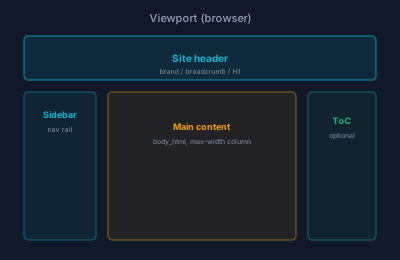
Wireframe SVG did not load (missing assets/svg/ copy or wrong page URL). Use Open live preview below for the real layout.
| Parameter | Type | Description |
|---|---|---|
browser_title | str | HTML <title> value |
page_title | str | Visible H1 in header bar |
sidebar_html | str | Sidebar navigation markup |
body_html | str | Main content area HTML |
toc_html | str | Right-rail table of contents (optional) |
extra_css | str | Additional inline <style> block |
extra_js | list[str] | Paths to extra JS files |
Used by
Kitchen Sink showcase mini-site (this site) — canonical reference for external generators
landing_page
Full-width hero page with no sidebar. Ideal for homepages and overview pages.
How the regions connect
- Vertical stack: no left sidebar; content uses full width.
- Nav is a single top bar; hero and body are separate slots.
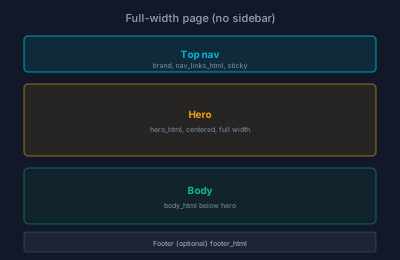
Wireframe SVG did not load (missing assets/svg/ copy or wrong page URL). Use Open live preview below for the real layout.
| Parameter | Type | Description |
|---|---|---|
browser_title | str | HTML <title> value |
hero_html | str | Hero section content |
body_html | str | Body content below hero |
nav_links_html | str | Top navigation bar links |
footer_html | str | Footer HTML (optional) |
announcement_html | str | Optional promo strip above header (.fs-site-announcement) |
Used by
Kitchen Sink landing page
marketing_page
Single-column marketing interior: collapsible top nav like landing, but no hero band. Optional announcement_html above the header.
How the regions connect
- Optional announcement strip, then Bootstrap navbar (brand + links).
- Main: single article column — no left sidebar, no hero band.
Wireframe SVG did not load (missing assets/svg/ copy or wrong page URL). Use Open live preview below for the real layout.
| Parameter | Type | Description |
|---|---|---|
browser_title | str | HTML <title> value |
body_html | str | Main article content |
nav_links_html | str | Navbar links (collapse on small screens) |
footer_html | str | Footer HTML (optional) |
announcement_html | str | Optional promo strip above header |
include_theme_toggle | bool | Forge appearance dropdown (default false) |
Used by
Public product pages without product_page sidebar chrome
listing_page
Marketing interior with optional filter sidebar and primary listing column — insights, events, or resource hubs.
How the regions connect
- Same navbar rhythm as marketing_page.
- Optional filter column + primary column inside .fs-listing-article.
- footer_html below the article row.
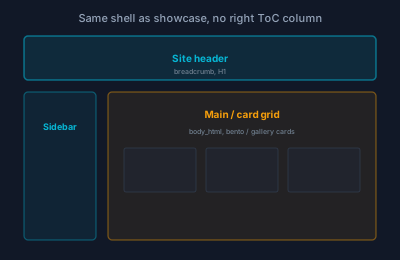
Wireframe SVG did not load (missing assets/svg/ copy or wrong page URL). Use Open live preview below for the real layout.
| Parameter | Type | Description |
|---|---|---|
browser_title | str | HTML <title> value |
body_html | str | Primary column: cards or list markup |
filter_sidebar_html | str | Optional left column (facets, categories); empty for full-width body |
nav_links_html | str | Navbar links |
footer_html | str | Footer after article (optional) |
Used by
Showcase enterprise-marketing.html; preview-listing.html
gallery_page
Sidebar + card grid content area, no right-rail ToC. Good for catalogs and asset browsers.
How the regions connect
- Same outer shell as showcase (header + sidebar).
- Main column is wider — intended for card grids or diagram thumbnails, not a ToC column.
Wireframe SVG did not load (missing assets/svg/ copy or wrong page URL). Use Open live preview below for the real layout.
| Parameter | Type | Description |
|---|---|---|
browser_title | str | HTML <title> value |
page_title | str | Visible H1 in header bar |
sidebar_html | str | Sidebar navigation markup |
body_html | str | Grid content area HTML |
Used by
Kitchen Sink diagram gallery
split_page
Sidebar + two-panel content: live example on the left, documentation on the right. Stacks vertically on mobile.
How the regions connect
- After the shared header + sidebar, the main area splits into two columns.
- Left: demo / preview; right: prose or API docs.
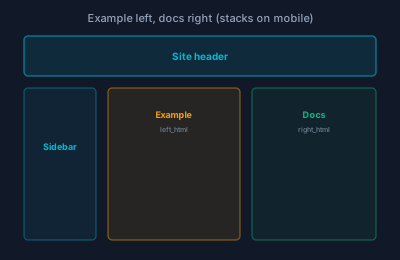
Wireframe SVG did not load (missing assets/svg/ copy or wrong page URL). Use Open live preview below for the real layout.
| Parameter | Type | Description |
|---|---|---|
browser_title | str | HTML <title> value |
page_title | str | Visible H1 in header bar |
sidebar_html | str | Sidebar navigation markup |
left_html | str | Left panel (example / preview) |
right_html | str | Right panel (description / code) |
Used by
Available for component detail pages
handbook_page
Auto-generated handbook page with 3-column layout (sidebar, content, ToC). Used by blueprints-website.
How the regions connect
- No separate “site header” band: sidebar and main start at the top of the viewport.
- Three columns: nav | article | section ToC.
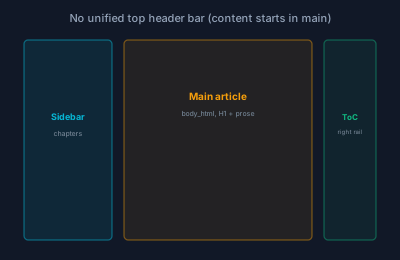
Wireframe SVG did not load (missing assets/svg/ copy or wrong page URL). Use Open live preview below for the real layout.
| Parameter | Type | Description |
|---|---|---|
browser_title | str | HTML <title> value |
page_title | str | Visible H1 |
sidebar_html | str | Sidebar navigation markup |
body_html | str | Main content (from Markdown) |
toc_html | str | Right-rail ToC |
Used by
blueprints-website (bpw)
chapter_page
Hand-crafted methodology chapter layout with JS-driven sidebar. Uses docs-theme.css.
How the regions connect
- Same 3-column grid as handbook; the schematic is shared.
- Difference: sidebar markup is filled by client-side JS (nav JSON), not only server HTML.
Wireframe SVG did not load (missing assets/svg/ copy or wrong page URL). Use Open live preview below for the real layout.
| Parameter | Type | Description |
|---|---|---|
browser_title | str | HTML <title> value |
page_title | str | Visible H1 |
sidebar_html | str | Chapter sidebar markup |
body_html | str | Chapter content |
Used by
blueprints-website methodology chapters
product_page
Product / marketing layout with tier-grouped sidebar. Uses forgesdlc-theme.css with fs-* classes.
How the regions connect
- Mobile-first: optional top bar triggers offcanvas on small screens.
- Desktop: tier-grouped sidebar + wide article column (different theme classes than Forge docs).
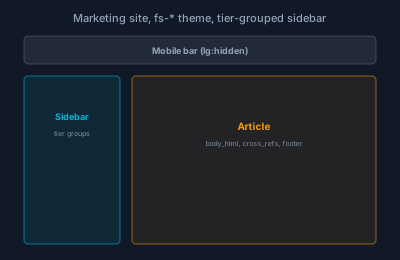
Wireframe SVG did not load (missing assets/svg/ copy or wrong page URL). Use Open live preview below for the real layout.
| Parameter | Type | Description |
|---|---|---|
browser_title | str | HTML <title> value |
page_title | str | Visible H1 |
sidebar_html | str | Product tier navigation |
body_html | str | Product page content |
Used by
forgesdlc.com (forge)